Skip to content

Paper in the field. Clarity in the office.

You didn't build a business to chase paper forms all day.

Let the crew keep the clipboard. A quick photo turns completed paperwork into an organised record the office can review, find, and share.

Assisted paper reading is in beta. A person checks the draft against the original before approval.

A male field worker's hand holding a phone on a blue background
Ready

Paper form captured

Daily cleaning inspection

Original attached

2 paper pages

Site identified
Answers organised
Ready for review
Send to the office
Vehicle pre-startsCleaning inspectionsJob sheetsIncident reportsMaintenance sign-offsToolbox meetings

PaperRelay

The clipboard can stay. The disappearing information doesn't have to.

PaperRelay connects the way work is already completed with the way the office needs to see it—without turning the change into an IT project.

One simple handover

From paper to proof of work.

  1. 01

    Photograph it

    The worker captures the completed pages.

  2. 02

    Check the draft

    The office compares the answers with the original.

  3. 03

    Use the record

    Approve, download, send, or follow up.

Harbour Care Property Services Ltd
Real PaperRelay demo · paper-assisted record
The real PaperRelay paper-assisted record screen showing a vehicle pre-start check
Original source identified Answers grouped for review Proof pack ready

The office view

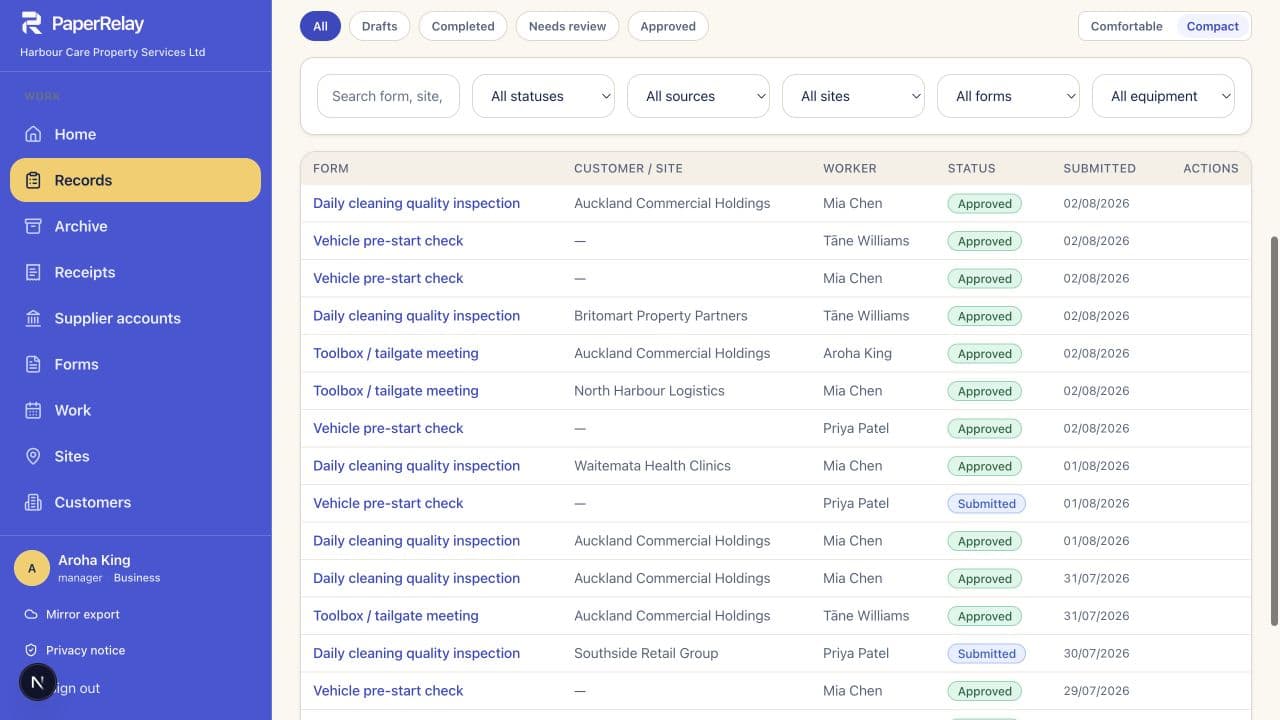
See what needs attention before it becomes a phone call.

Overdue work, records waiting for review, and recently completed forms all arrive in one calm dashboard. No spreadsheet archaeology required.

Harbour Care Property Services Ltd
The real PaperRelay team dashboard showing overdue work and records

Do next

Overdue and due work stays visible.

Review

Paper imports wait for a person.

Share

Approved records are ready when needed.

For the crew

One job. Two familiar ways to finish it.

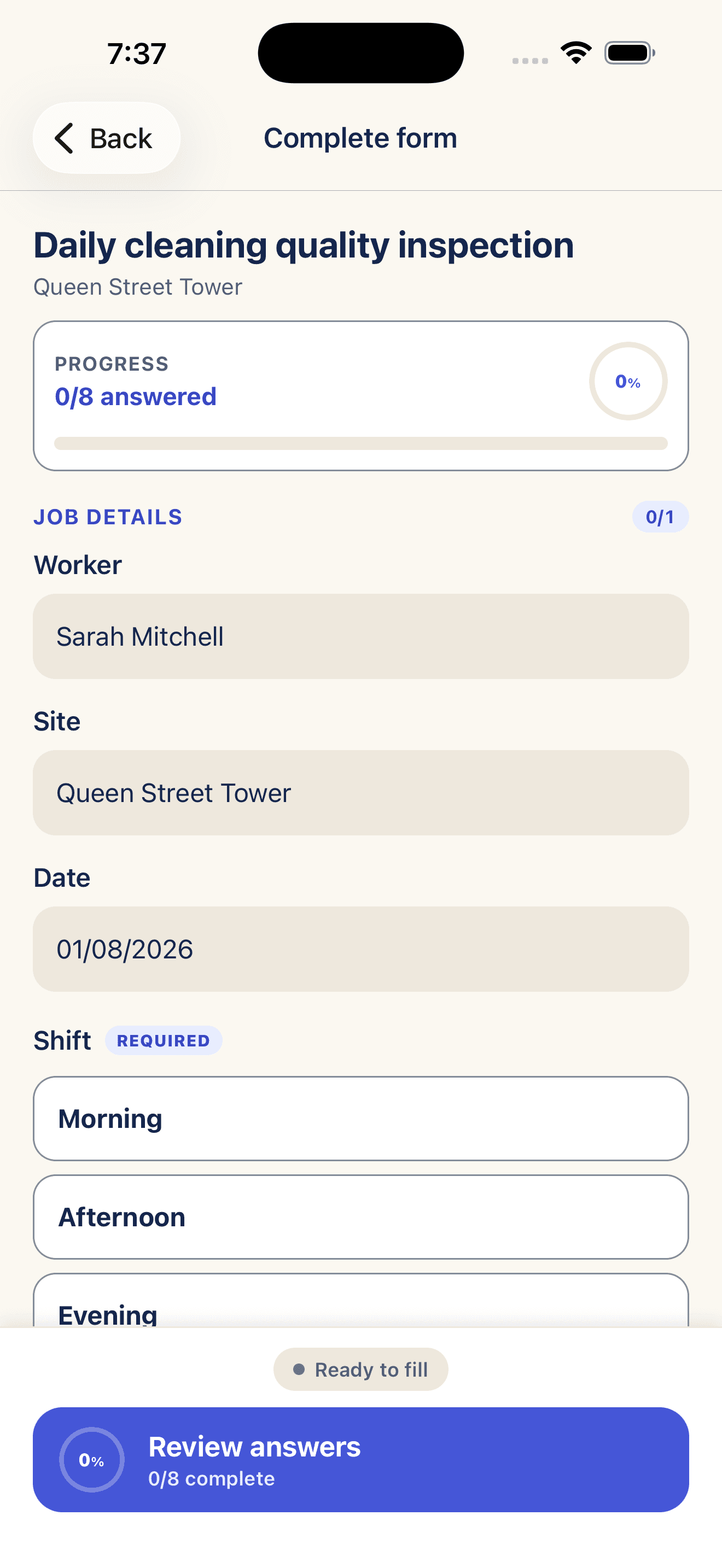
The worker chooses the phone form or photographs the paper they already completed. They do not have to understand workflows, databases, or integrations.

Only show the next task
Capture photos and signatures when needed
Send everything to the same office workspace
9:41●●●

Daily cleaning inspection

Queen Street Tower · due today

How are you completing it?

Fill it on this phone

Questions, photos and signatures in one guided form.

Start digital form

Photograph the paper

Keep the familiar sheet and send the completed copy in.

Open camera

Records you can stand behind

The useful answers and the evidence behind them stay together.

Original attached

Open the paper beside the organised answers whenever something needs checking.

A person approves it

Assisted reading prepares the draft; your team decides when it becomes the finished record.

Your copy leaves with you

Download proof packs and records instead of trusting the platform as the only archive.

Fits the office you already have.

Choose the connections that help. Leave the rest alone.

Gmail or Outlook Google Drive Google Calendar

Clear pricing

Start with one. Pay less per person as the team grows.

Choose a 1+, 5+, or 20+ person starting point. Every person includes 100 assisted paper pages each month.

Business plans

Every business tier, shown upfront.

Every plan includes 100 assisted paper pages per person, unlimited form templates, and unlimited digital submissions.

1+ people

Business Starter

From NZ$39/mo

Start with one person and add more whenever the business needs them.

  • 1 person included; add more for NZ$15/user/month
  • 100 assisted pages per person each month
  • Unlimited form templates and digital submissions
  • Gmail or Outlook, Drive, and Calendar
  • 25 one-time archive credits
Choose Starter

5+ people

Recommended

Growing Team

From NZ$89/mo

For teams of 5+ people.

  • 5 people included; add more for NZ$12/user/month
  • 100 assisted pages per person each month
  • Unlimited form templates and digital submissions
  • Gmail or Outlook, Drive, and Calendar
  • 100 one-time archive credits
Choose Growing Team

20+ people

Business Scale

From NZ$240/mo

A lower per-user rate for businesses with 20+ people.

  • 20 people included; add more for NZ$10/user/month
  • 100 assisted pages per person each month
  • Unlimited form templates and digital submissions
  • Gmail or Outlook, Drive, and Calendar
  • 250 one-time archive credits
Choose Scale

50+ or complex

Operations

Custom pricing

A tailored rollout for 50+ field users or complex operations.

  • 50+ field users
  • 100 assisted pages per configured user
  • Unlimited form templates and rollout planning
  • Gmail or Outlook, Drive, and Calendar
  • 500 one-time archive credits
Discuss Operations

People and monthly assisted pages can be adjusted later. Archive credits are a separate, non-expiring balance for historical document imports; the amount above is added once when the paid plan starts.

Straight answers

What people ask before the first form.

This should feel like a practical improvement, not a software project.

Do our crews have to stop using paper?

No. Keep the form that already works. The crew photographs the completed copy, and the office receives an organised record with the source image attached. You can move individual forms to phone-based completion later.

What happens after someone photographs a form?

PaperRelay reads the completed copy and prepares a draft of the names, dates, selections, and notes it recognises. The original stays beside the draft, and a person checks the record before it is approved.

Can the same form also be completed on a phone?

Yes. Workers can choose the familiar paper form or a guided mobile version. Both routes arrive in the same office workspace, so your records stay together.

Who can see our records?

Records live inside your organisation workspace and are limited to signed-in members. A record is only shared outside the workspace when your team chooses to send or export it.

Can we keep our own copy?

Yes. Download records locally or mirror selected exports into Google Drive. The source paper remains attached to scanned records, so the extracted answers are never your only copy.

Start with one form

There is already a form worth fixing on your desk.

Keep the paper if you want. Just stop letting the useful record disappear with it.